
What is the body worn camera manager software?
Overview:
Camera manager software is designed for managing and configuring basic and network settings of cameras. It effectively sets the working video parameters and 4G network connection parameters for body-worn cameras and military tactical helmet cameras, while also providing access to camera data that cannot be altered and ensuring security.
How do I set the basic parameters for the Body Worn Camera and Tactical Helmet Camera?
Basic settings include: Device ID, Camera Password, Camera Time, Video Resolution, Video Length, Loop Recording, Pre-recording, IR Night Vision, Image Size, Video Encoding, GPS, Guest Mode, Motion Detection, AES Encryption, Post-recording, and Stealth Mode.
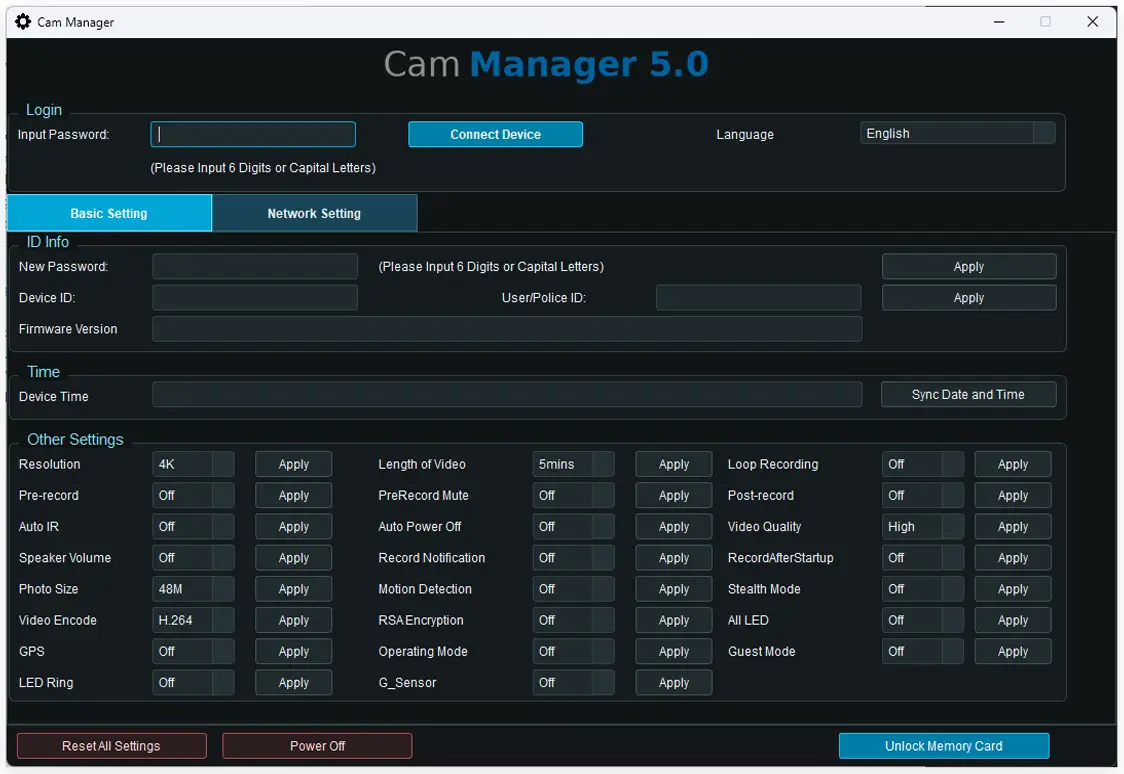
Device ID: This is a unique 7-digit (7 alphanumeric) ID for each camera. It's a unique identifier assigned to staff and used for 4G network connection. This ID is displayed in the camera's video watermark and live stream on the scheduling platform.
Camera Password: Designed to protect the data within the camera, preventing unauthorized access to computers to copy data and preventing others from tampering with video evidence.
Camera Time: Users can synchronize the camera's time, video, image, and audio recordings to ensure data is recorded at the correct time or date. This time is displayed in the camera's video watermark and live stream on the scheduling platform.
Video Resolution: This refers to the video resolution, such as 4K, 1440P, 1296P, 1080P, 720P, 480P. You can set different resolutions to record clearer video according to your needs. Different resolutions require different storage space. We recommend choosing 1080P for normal camera use, as it suits most users' needs.
Video Length: To facilitate video use in different scenarios, we've set video length options of 5 minutes, 10 minutes, 15 minutes, 20 minutes, 25 minutes, and 30 minutes. This makes it easier to manage and search for specific scene footage.
Loop Recording: This function allows the camera to loop recording after its storage space reaches 100%, replacing older videos with the newest ones. The retention time varies depending on the storage space available.
Pre-recording: We've designed different pre-recording time options such as 10 seconds, 20 seconds, 30 seconds, 60 seconds, and 120 seconds. You can set different time periods according to your needs. When you press the record button, the video will first record the pre-recording time you set, and then continue recording for the set video length.
IR Night Vision: Designed for nighttime use, you can choose between manual and automatic modes. In manual mode, IR night vision is activated via the camera settings button. In automatic mode, IR night vision is automatically activated based on the natural environment.
Image Size: Set different image sizes according to your needs; it will record the image size you set.
Video Encode: It offers H.264 and H.265 options. Choose the setting that best suits your requirements; we recommend setting H.265 video encoding for superior video detail.
GPS: This is for viewing historical paths or real-time tracking. Once a GPS signal is received, it will be displayed in the video watermark and command platform's live video map window to view the camera's real-time location.
Guest Mode: Based on departmental or group management requirements, this function prevents staff from operating the camera mid-recording to avoid interrupting video recording, ensuring continuous 24-hour recording.
Motion Detection: When enabled, this function automatically detects moving objects and automatically activates video recording.
AES Encryption: This function encrypts data to protect the originality of the video; however, unauthorized personnel cannot play back the video. Only administrators have playback privileges.
Post-Recording: Different delay time options, such as 30 seconds and 120 seconds. You can set different time periods according to your needs. When you press the stop recording button, the video will stop recording and resume recording for the set delay time.
Stealth mode: When stealth mode is set, all camera indicator lights and beeps will be turned off to ensure stealth shooting.
How to configure the WiFi and 4G network parameters for a body-worn camera and a tactical helmet camera?
To view live streams via WiFi or 4G, the following parameters need to be configured: WiFi, 4G, server IP, streaming protocol, and live video resolution.
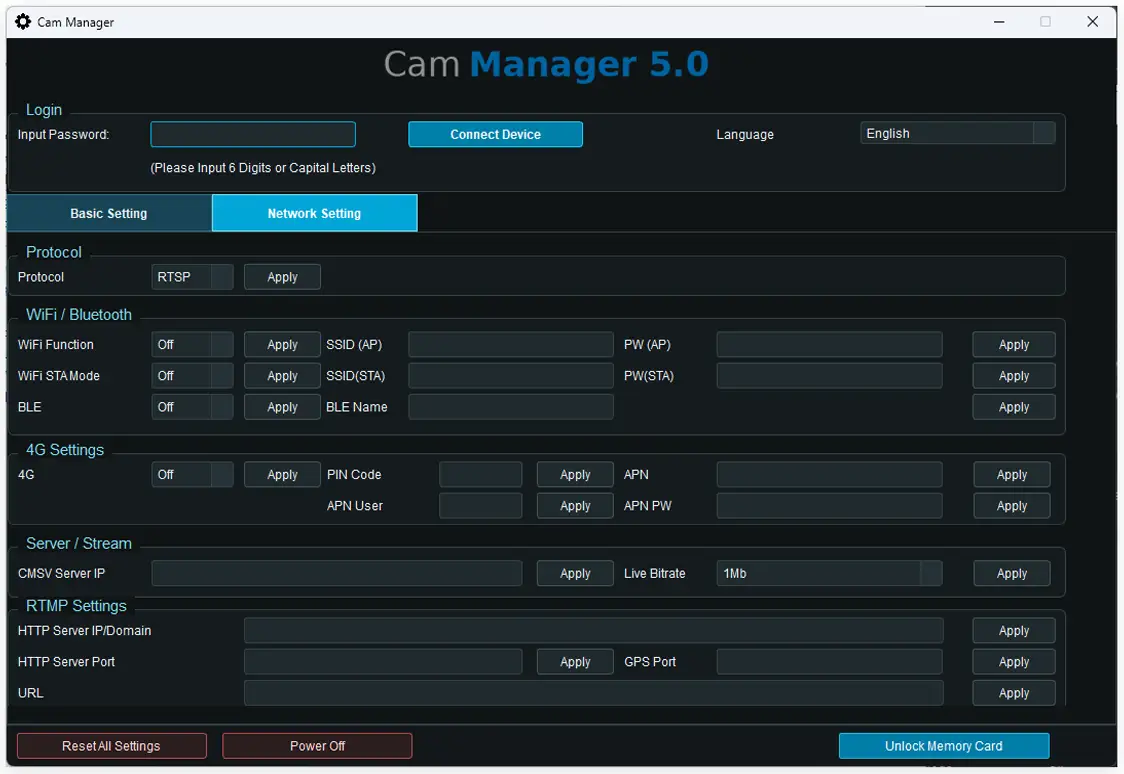
WiFi network: Configure the WiFi SSID and password to connect to the server's public IP address.
4G network: Enable 4G network access and configure the correct APN to connect to the server's public IP address.
Server IP: Configure the correct server's public IP address to ensure the camera has a WiFi or 4G network connection.
Live Streaming Protocol: Configure the server software's live streaming protocol (CMSV).
Live Streaming Video Resolution: Set the live streaming video resolution as needed. Higher resolution provides better clarity but requires more network bandwidth.
Cam Manager software is compatible with all NOVESTOM models:
Body worn camera NVS4-T Pro, 4G Body worn camera NVS4-T Pro, Body worn camera NVS4-D, 4G Body worn camera NVS4-D, Body worn camera NVS4-Q, 4G Body worn camera NVS4-Q, Body worn camera NVS4-A, 4G military tactical helmet camera S29D, military tactical helmet camera S29D.